
SSO
Single Sign-on (SSO) in the software development kit (SDK) is designed to integrate the 98point6 experience with the host app by not forcing a user to authenticate a second time. 98point6 uses partner key-pairs and JSON web tokens (JWTs) to validate the authenticity of token payloads. Partners wishing to enable SSO should have a mixture of backend and mobile expertise in order to build the requisite foundations for this integration.
The following chart details the path of how data flows from partners to 98point6:
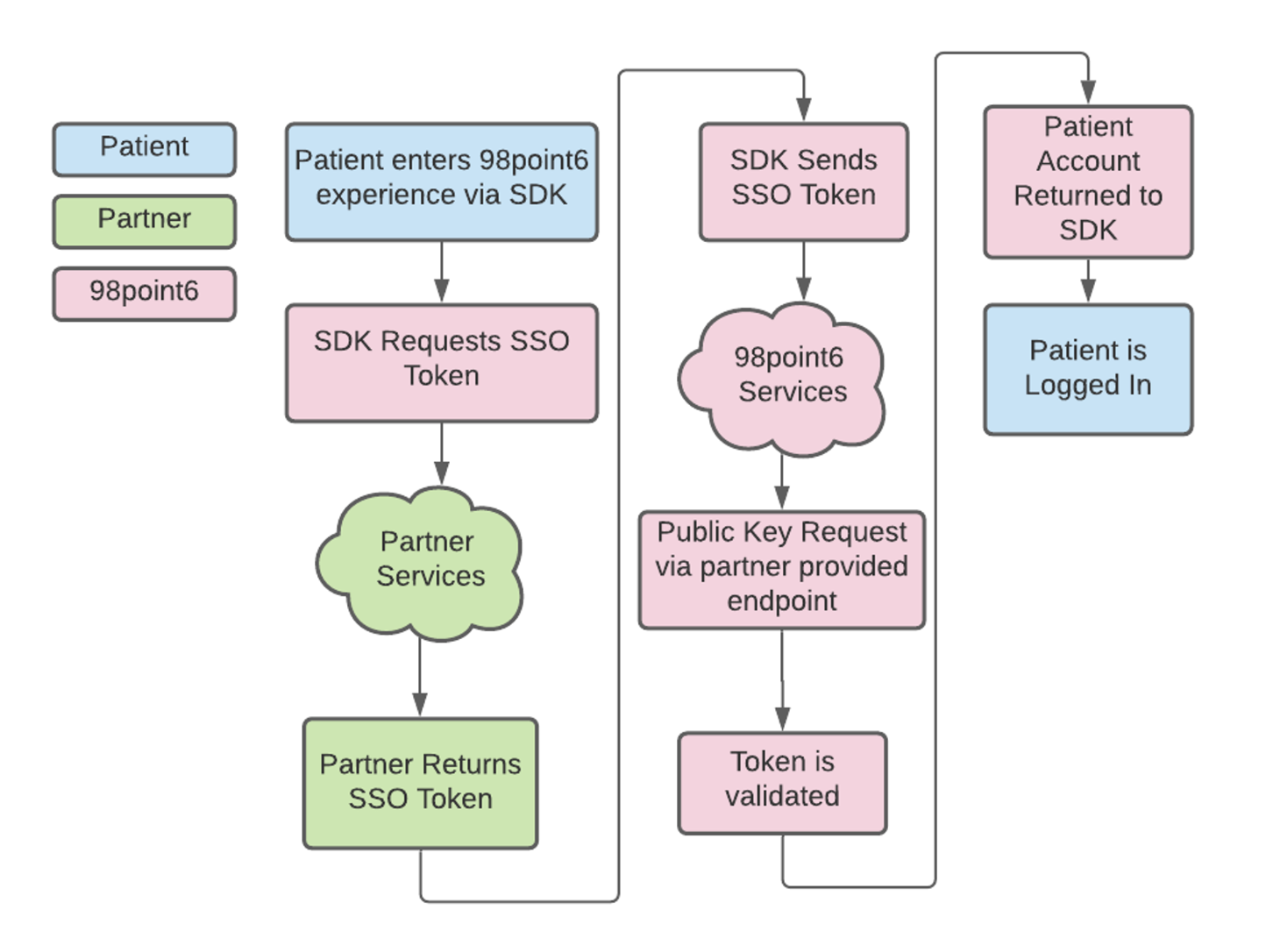
When a member launches the 98point6 SDK for the first time from within the partner host app, they’re prompted to enter their mobile phone number and one-time-password (OTP) before proceeding with 98point6 onboarding.
When the user reaches the 98point6 onboarding screens, many of these fields are pre-filled with data sent from the partner host app, allowing for the patient to more quickly complete onboarding, establish a subscription, and seek care from 98point6.
On subsequent logins to 98point6 from within the partner host app, this user will not be prompted to enter their phone number or OTP and will instead be taken directly to the 98point6 Home screen.